
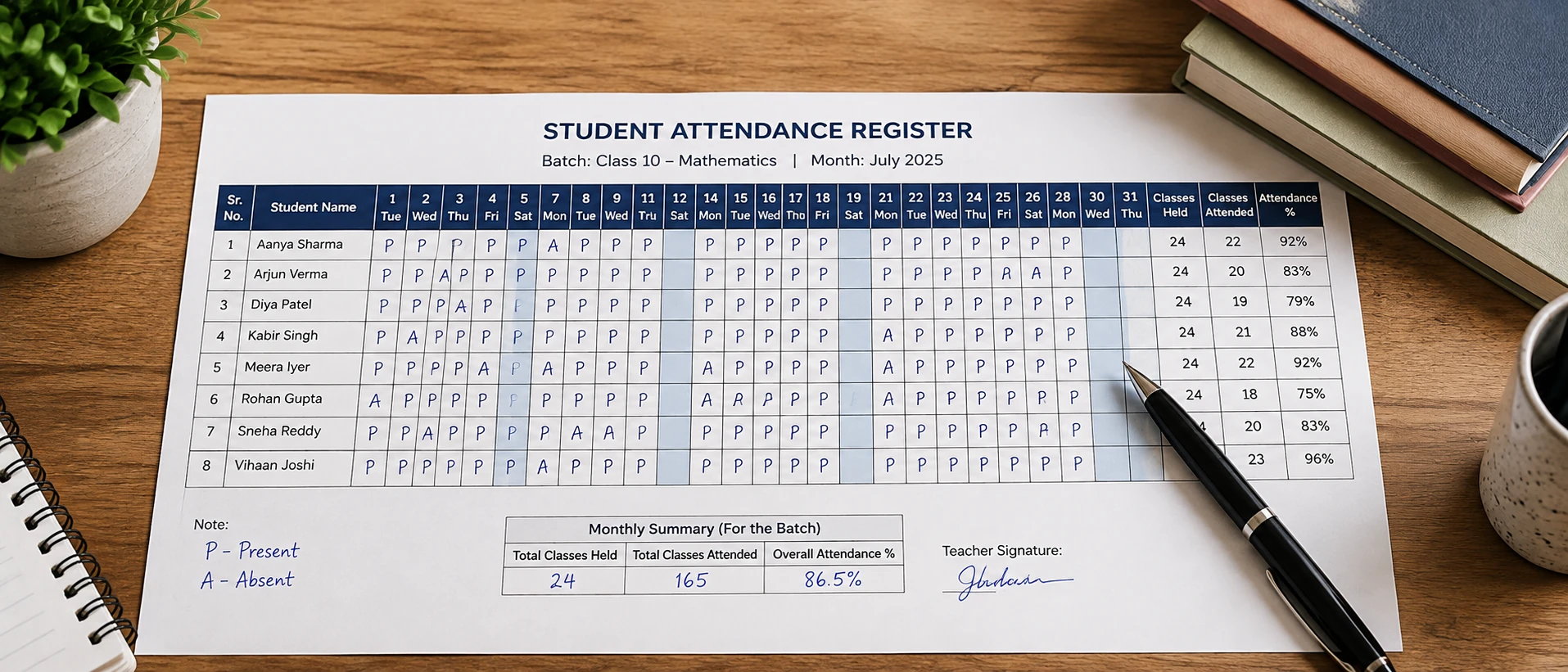
If a parent asks how many classes their child attended last month, you should be able to answer in a few seconds, not go searching through old notebooks. That's really what an attendance register is for in a tuition class or small coaching centre — a quick, reliable record of who showed up and when.
This page has a free attendance register template, in Excel and PDF, made for individual tutors and small coaching centres across India rather than schools. If you prefer taking attendance effortlessly on your phone, you can also use a digital tuition attendance register app.
What an Attendance Register Should Contain
A tuition class doesn't need a complicated register. It needs to answer two questions well: who attended, and how much has each student attended overall.
Useful fields for a tuition/coaching context:
- Student name
- Date/day — one column per class held
- Batch or subject — only if you teach more than one batch or subject
- Present/Absent marking — a plain P/A is enough
- Monthly summary — total classes attended vs. total classes held, per student
Tuition attendance is different from school attendance in one main way: schools maintain registers for administrative and reporting purposes, often with multiple leave categories and formal documentation requirements. A tutor's register exists purely for practical tracking — so it can, and should, be simpler. You don't need leave categories, guardian sign-offs, or ID numbering systems built for institutional record-keeping.
Free Attendance Register Template
Use the Excel version if you're comfortable typing into a spreadsheet. It totals each student's attendance automatically, and you can copy the sheet for a new month in seconds.
Use the PDF version if you prefer to mark attendance by hand during class — print it, keep it on your desk, and fill it in as students arrive. No laptop needed.
Both versions use the same fields, so you can move between them without changing your format.
Template Preview
Below is a preview of how the attendance register is structured for 31-day tracking with automatic total calculation:
| Student Name | D1 | D2 | D3 | D4 | D5 | D6 | D7 | ... | D28 | D29 | D30 | D31 | Total Present | % Attendance |
|---|---|---|---|---|---|---|---|---|---|---|---|---|---|---|
| Aarav Sharma | P | P | P | A | P | P | P | ... | P | P | P | P | 28 / 31 | 90% |
| Priya Patel | P | P | A | P | P | P | P | ... | P | A | P | P | 26 / 31 | 84% |
| Rohan Gupta | P | P | P | P | P | A | P | ... | P | P | P | P | 29 / 31 | 94% |
| Ananya Roy | A | P | P | P | P | P | P | ... | P | P | P | A | 27 / 31 | 87% |
How to Use the Register Effectively
Daily marking
Mark each student P or A as class starts, not afterward — it's easy to forget a name once the lesson is underway.
Monthly review
At the end of each month, check the totals. A student whose attendance has dropped noticeably is often worth a quiet word before it shows up in their results. Start a fresh sheet or page for the next month rather than extending the same one indefinitely — it makes old records easier to find later.
Handling different batches
If you teach more than one batch, keep a separate register (or a separate sheet within the same Excel file) per batch. Mixing batches into one long list makes both daily marking and monthly totals harder to check at a glance.
Keeping records consistent
Use the same marking style every time — don't switch between ticks, P/A, and colour-coding across different months. Consistency is what makes a register actually useful when you need to look something up later.
Paper/Excel Attendance vs Digital Attendance
Both paper and Excel work well for a lot of tutors, and neither is the "wrong" choice.
Paper or Excel is enough when:
- You teach one or two batches
- Your student count is small enough to total by hand without much effort
- You rarely need to look back at older records
Manual tracking starts to strain when:
- You're running several batches and cross-checking who belongs to which one takes real time
- Your student count has grown enough that monthly totals become tedious or error-prone
- You've had to dig through old sheets to answer a parent's question and it took longer than it should have
- Attendance is tracked in one place and fees in another, and keeping them in sync is extra manual work
None of this means paper is outdated — it means the right tool depends on how many students and batches you're actually managing.
How GuruDesk Can Help
GuruDesk includes Student Attendance Tracking as part of the platform, so you can mark attendance for your batches digitally instead of maintaining a separate register by hand. It's most useful once the situations above start applying — multiple batches, a growing student count, or needing to check past attendance without searching through old sheets.
If your current paper or Excel register is working fine, there's no need to change it.
FAQ
What should an attendance register for tuition classes include?
At minimum, student name, date, and present/absent marking. Add a batch column if you teach more than one batch, and a monthly total so you don't have to add it up by hand each time.
Is an attendance register necessary for private tutors?
It's not a legal requirement for private tutors in the way it can be for schools, but it's practically useful — for answering parent questions, noticing attendance drops early, and keeping a simple record of your own teaching history.
Should I use Excel or a paper attendance register?
Either works. Choose Excel if you want automatic totals and easier searching later. Choose paper if you'd rather mark attendance by hand during class without needing a device nearby.
How do I calculate student attendance percentage?
Divide the number of classes attended by the total number of classes held, then multiply by 100. For example, 17 attended out of 20 held is 85%.
Can one attendance register be used for multiple batches?
It can, but it's usually clearer to keep a separate sheet or page per batch. A single long list mixing batches makes both daily marking and monthly totals harder to read at a glance.
Conclusion
For most individual tutors and small coaching centres, a simple paper or Excel attendance register — like the templates above — does the job well. It's worth considering digital attendance tracking mainly once manual upkeep itself becomes the friction point: more batches to manage, a growing student list, or trouble finding past records when you need them. Start with the template, and change only when you actually feel that friction.