

Many tuition teachers in India don't start with software. They start with a notebook, or a spreadsheet, or a WhatsApp group — sometimes all three at once. And for a while, that works fine.
The trouble usually shows up later: a parent asks whether last month's fee was paid, and you have to scroll back through chats or flip through a register to check. A student says they were present on a day you marked absent. A new batch starts and you're not sure which sheet has the latest list. None of these problems are dramatic on their own, but together they eat time you'd rather spend teaching.
This article isn't here to tell you there's one "best" app for every tuition teacher. There isn't. The right tool depends on how many students you teach, how many batches you run, whether you work alone, how fee collection actually happens for you, and how much time you're willing to spend setting something up. What this article will do is walk through the real options — paper, spreadsheets, WhatsApp, and dedicated tuition-management software — so you can figure out which one actually fits your situation, and where a tool like GuruDesk does and doesn't make sense.
A tuition-management app is software that helps tutors organise the administrative side of their classes — typically student records, batches, attendance, fees and payment history — built around the recurring workflows of running tuition classes rather than adapted from a general-purpose tool like a spreadsheet.
Attendance, Fee Receipts, and Reminders: The Core Workflow
Before comparing tools, it helps to know what you're actually evaluating. Not every teacher needs every capability below — but knowing what each one solves makes the comparison later much easier.
Student management. A single place to store each student's name, contact details, batch, and fee status. Matters once you're teaching more students than you can hold in your head. Less important if you teach a handful of students you already know well.
Batch management. Grouping students by class, subject, or timing so you can work with a batch as a unit instead of student-by-student. Matters as soon as you run more than one batch. Not very relevant for a single one-on-one tutor.
Attendance. A way to record who was present or absent, and look that history up later. Matters if attendance disputes come up, or if you need proof of attendance for parents. Less critical if you teach in a fixed one-on-one slot where presence is obvious.
Fee management. Tracking what each student owes, what's been paid, and what's pending. This becomes genuinely useful once you have more than a few students on different payment schedules — monthly fees, one-time charges, partial payments.
Payment history. A record of past payments per student, separate from just "how much is owed now." Useful when parents ask about a specific month, or when you need to reconcile your own records at year-end.
Receipts. A formal or semi-formal proof of payment. Matters more for coaching centres that need to look organised and professional; less critical for a small home tutor who's paid in cash and trusted informally.
Mobile usability. Whether the tool is genuinely comfortable to use on a phone, since many teachers manage their classes between lessons, not at a desk. If you rarely open a laptop, this matters a lot.
Simplicity. How much time it takes to learn the tool and use it daily without friction. A powerful tool that takes 20 minutes to update after each class isn't actually saving you time.
Data backup and recovery. What happens to your records if your phone breaks or you switch devices. Worth checking before you commit years of student data to any single tool — paper included.
Pricing and limits. What's free, what's paid, and where the free tier stops being enough as you grow.
The Main Options Tuition Teachers Use
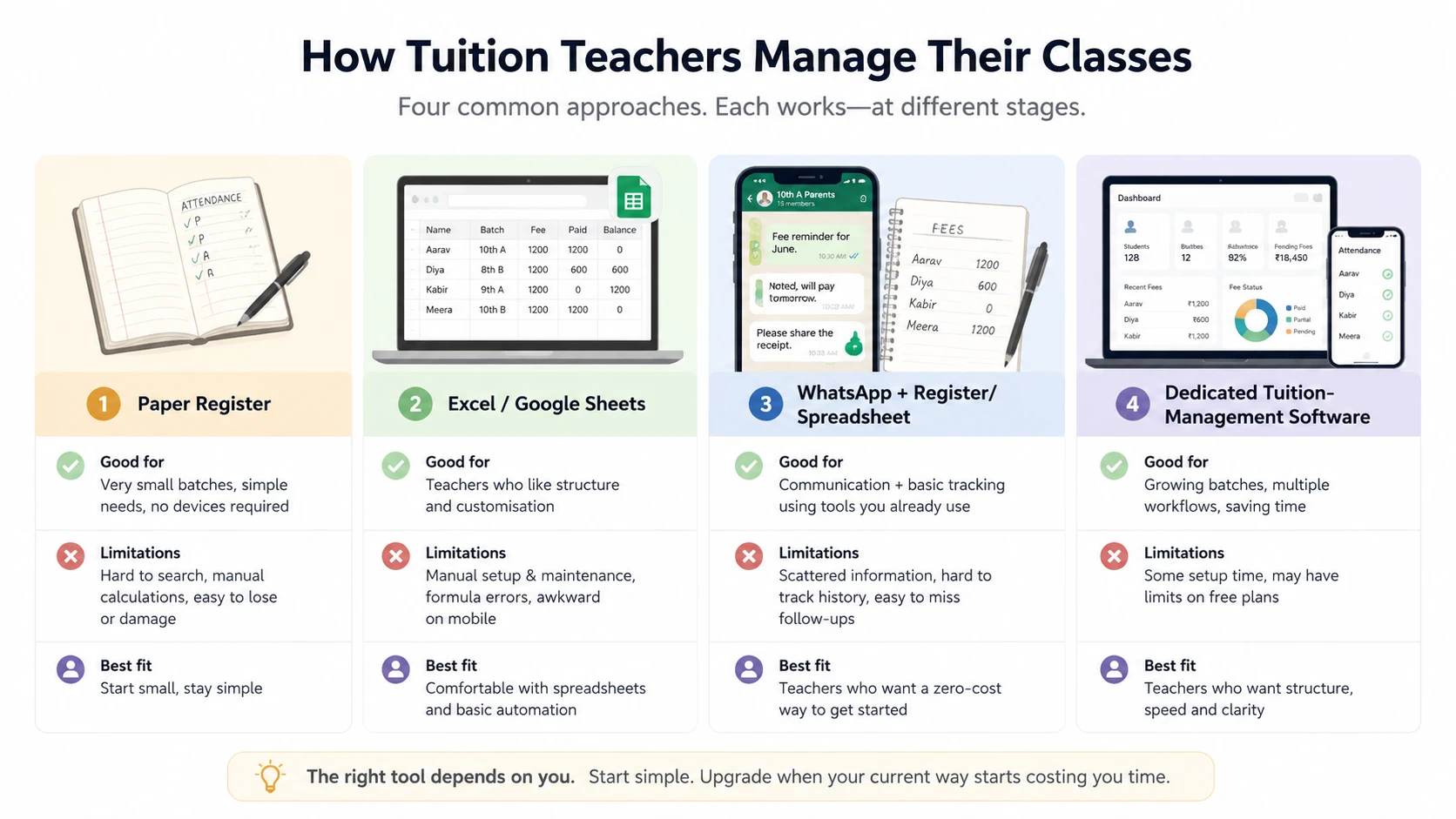
1. Paper Attendance & Fee Registers: Simple but Risky
Advantages: Familiar, costs nothing extra, works without a device or internet connection, and needs no setup at all. For a teacher who has used a register for years, there's real value in a system that requires zero learning curve.
Limitations: Searching for a specific student's history means flipping pages. Fee totals have to be calculated by hand. Looking back at trends — who's been absent a lot, who's behind on fees — is slow and error-prone. A register can also be lost, damaged, or simply left behind, and there's no copy if that happens.
Paper is not a bad choice. For a teacher with a small, stable group of students and no complex fee structure, it can be entirely adequate. If you issue receipts, comparing fee receipt books and digital fee management can help you decide when it's time to upgrade.
2. Excel & Google Sheets: Free but Hard to Maintain on Mobile
Advantages: Flexible — you can structure it however you like. Familiar to most people who've used a computer for work or study. Free or effectively free, and easy to customise for your exact fee structure.
Limitations: The structure is entirely on you to build and maintain. Formulas break when someone edits the wrong cell. Spreadsheets can be less convenient to manage on a phone, particularly when the sheet becomes large or involves multiple formulas and tabs. And a spreadsheet wasn't built specifically for attendance or fee tracking — it can be made to do the job, but the more batches and students you add, the more maintenance it demands. Once fee tracking becomes more complicated, a more structured system can be easier to maintain.
Sheets are a genuinely good fit for teachers who are comfortable building their own system and whose needs are still fairly simple.
3. WhatsApp + Spreadsheets: The Common DIY Hack
Many teachers combine tools rather than picking one. WhatsApp handles communication — reminders, updates to parents, sharing a homework note — while a register or spreadsheet handles the actual records.
This combination works well for what it's designed for: quick, informal communication. What it doesn't replace is structured record-keeping. WhatsApp chat history is not a fee ledger, and scrolling through months of messages to confirm a payment is slow and unreliable. Teachers using this setup are usually fine on communication but still exposed to the same record-keeping problems as paper or spreadsheets alone.
4. Dedicated Tuition Management Apps (e.g. GuruDesk): Built for Solo Teachers
Advantages: Records are structured by design — students, batches, attendance and fees each have a proper place rather than being reconstructed from a general-purpose tool. Batch management and attendance tend to be quicker for daily use. Fee tracking and payment history are centralised, so answering "has this student paid?" doesn't require searching.
Trade-offs: There's a learning curve, even if a small one. Some tools charge a subscription once you go past a free tier. Setting up your students and batches takes some initial effort. And for a teacher with very few students and no real administrative pain point, dedicated software can be more than what's actually needed.
Which Tuition App or Setup Fits Your Class Size?
There's no fixed student count where you "graduate" from paper to software — it depends on your actual pain points, not a number. That said, some patterns are common:
If you teach only a handful of students, a register or a simple spreadsheet is probably enough. The overhead of setting up dedicated software may not be worth it yet.
If you manage several batches, especially with different schedules, a dedicated system tends to save real time because you can work batch-by-batch instead of student-by-student.
If tracking pending fees is genuinely difficult — you're not sure who's paid this month, or you keep having to ask — prioritise a tool with solid fee-management functionality over one that just looks polished.
If attendance questions come up often, from parents or students, prioritise a tool with clear attendance history you can pull up quickly.
If you issue payment receipts, look specifically for built-in receipt or invoice generation rather than creating them manually each time.
If you manage your classes mostly from your phone, between lessons or on the move, prioritise mobile usability over feature count. A feature-rich tool that's painful on mobile won't get used consistently.
Key Features Every Tuition Teacher App Needs
Regardless of which tool you're considering, a genuinely useful tuition app should be:
- Easy to learn — you shouldn't need a manual to mark attendance or record a payment
- Fast for daily workflows — the things you do every day (attendance, checking a fee status) should take seconds, not minutes
- Built around student records that are easy to find and update
- Capable of proper batch management, not just a flat list of everyone you teach
- Clear on attendance, with history you can actually look back on
- Clear on fee tracking, showing what's owed and what's been paid without manual calculation
- Able to show payment history per student, not just a current balance
- Able to issue receipts, if that matters for your teaching setup
- Comfortable on mobile, since that's how many teachers will actually use it day to day
- Reasonably priced, with limits that make sense for where you are now and where you're headed
- Honest about data ownership and backup — you should know what happens to your records if you stop using the tool or switch devices
- No more complicated than you actually need — extra features you'll never touch are not a benefit
GuruDesk as an Option for Tuition Teachers
GuruDesk is a mobile-first tool for coaching centres and tutors, built specifically for the administrative side of running tuition classes — not for online teaching or content delivery, and not as a full accounting system.
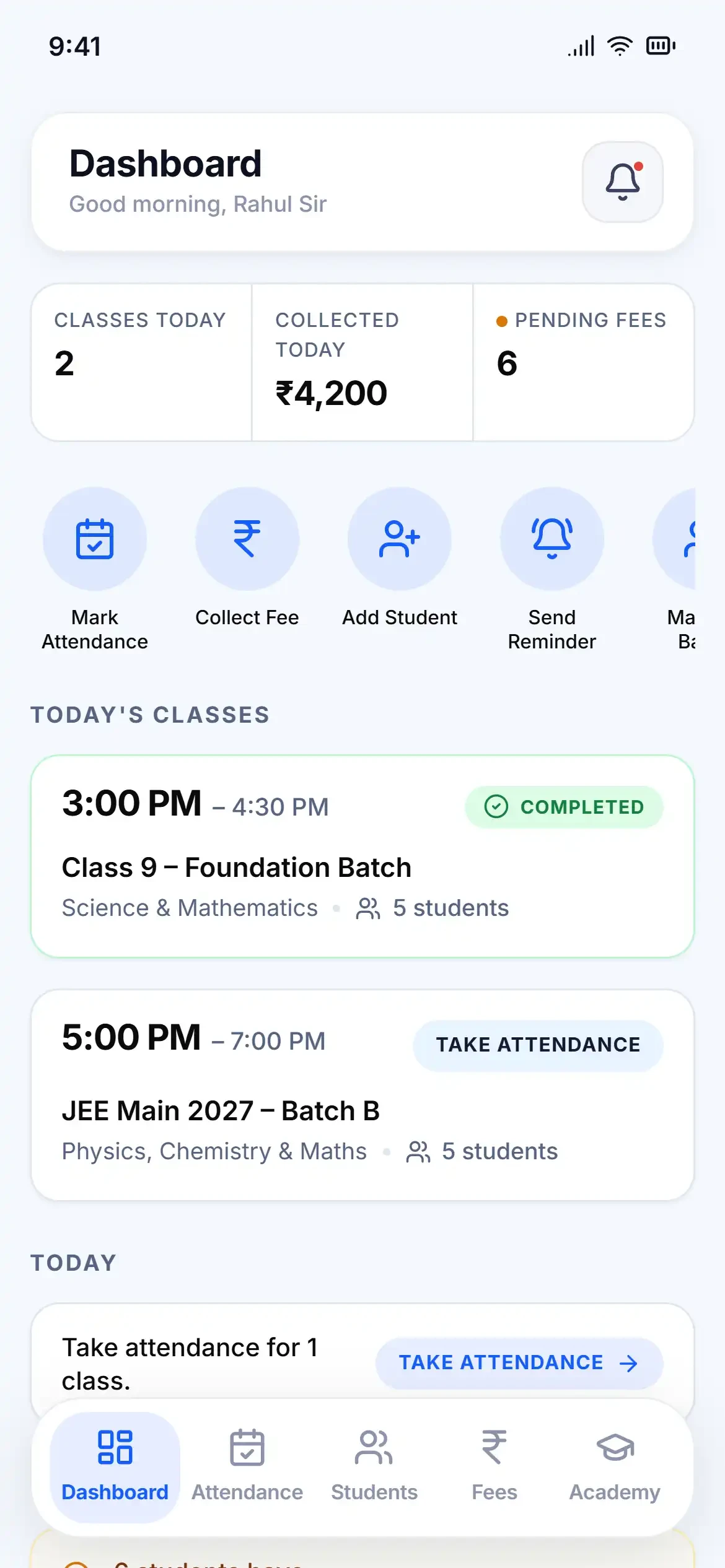
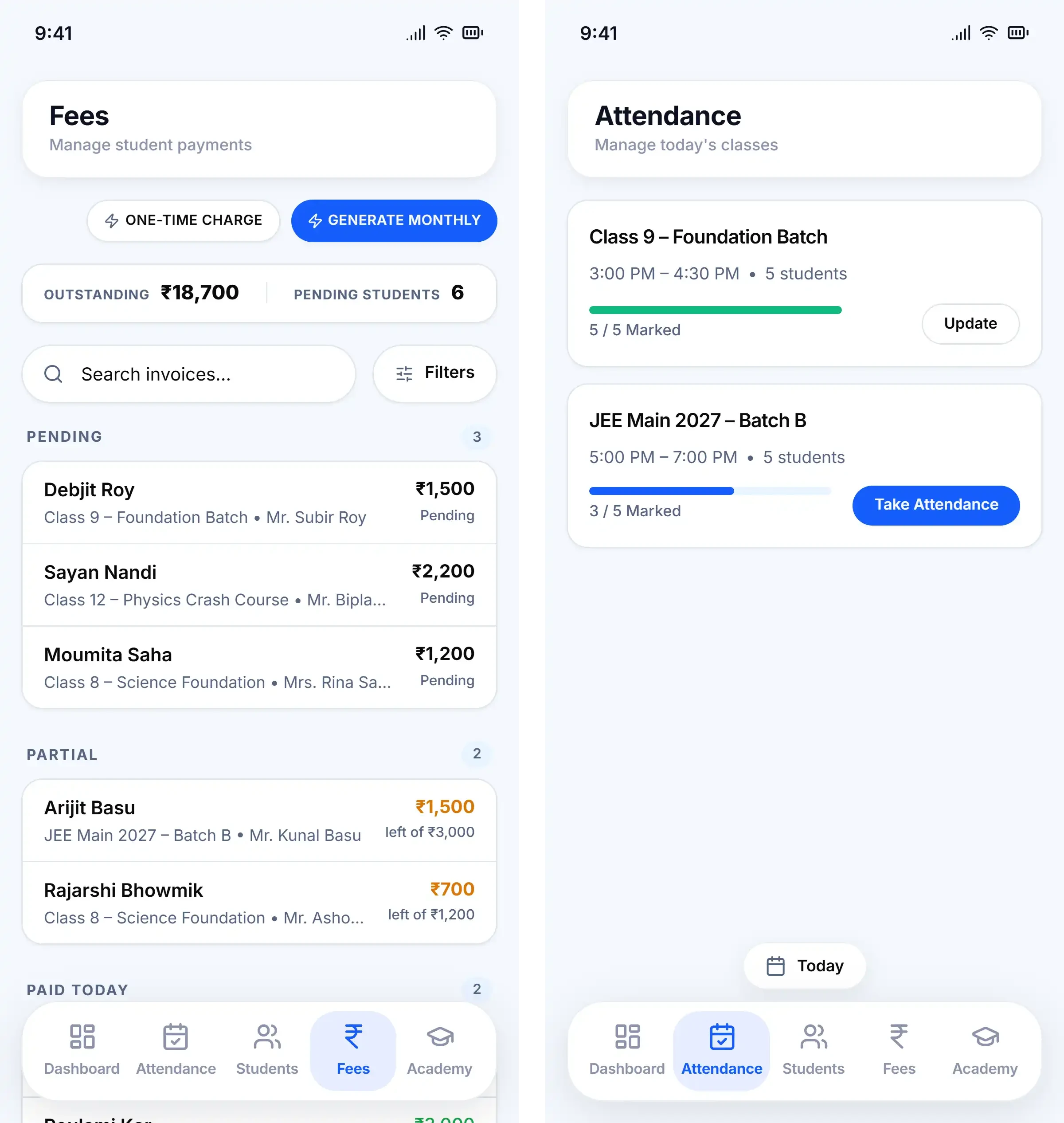
Its current core areas are student management, batch management, attendance tracking, and fee management, including invoices, payment records, outstanding balances, and one-time charges alongside recurring fees. The product is focused on the day-to-day work of running batches and collecting fees rather than the administrative overhead of larger, multi-branch systems.
GuruDesk has a free tier with defined student and batch limits, with paid plans available for higher limits, so a teacher can start using it without commitment and see whether it actually fits before paying anything. Since pricing and limits can change, it's worth checking GuruDesk's current pricing directly rather than relying on any fixed figure.
Who this may suit: a tutor or small coaching centre running multiple batches, who finds fee tracking or attendance genuinely time-consuming in their current setup, and who works primarily from a phone.
Who probably doesn't need it yet: a solo tutor with a small, stable group of students and a notebook or spreadsheet that already works without friction. If nothing is currently painful about your record-keeping, switching tools mainly adds a learning curve without solving a real problem.
A note on transparency: this article is published by GuruDesk, and GuruDesk is one of the options compared here. It's included on the basis of what it currently does, not a claim that it's the best choice for every teacher.
GuruDesk vs Paper vs Excel vs Dedicated Software
"Dedicated software" below refers to the general category of tuition-management tools, not one specific competitor — capabilities and depth vary between providers, so treat that column as a typical picture rather than a fixed standard.
| Need | Paper | Excel/Sheets | Dedicated software (general) | GuruDesk |
|---|---|---|---|---|
| Student records | Manual, hard to search | Manual, searchable | Structured, purpose-built | Structured, purpose-built |
| Batch management | Manual grouping | Manual, via sheets/tabs | Usually built-in | Built-in |
| Attendance | Manual, slow to review | Manual, formula-dependent | Usually built-in | Built-in |
| Fee tracking | Manual calculation | Manual, formula-dependent | Usually built-in | Built-in |
| Payment history | Register lookup | Sheet lookup | Usually built-in | Built-in |
| Receipts | Handwritten or none | Manual template | Varies by product | Digital receipts |
| Mobile workflow | N/A | Often awkward | Varies by product | Mobile-first by design |
| Setup complexity | None | Low–moderate (self-built) | Moderate | Guided onboarding with initial setup |
| Flexibility | High (fully manual) | Highest (fully customisable) | Lower (fixed structure) | Lower (fixed structure) |
| Cost | Free | Free/near-free | Often subscription-based | Free tier, with paid plans for higher limits |
No tool wins on every row, deliberately. Paper wins on zero setup. Excel wins on flexibility. GuruDesk and other dedicated tools trade some of that flexibility for structure and speed on the tasks that come up every day.
Questions to Ask Before Choosing a Tuition App
Whatever you're considering — GuruDesk or anything else — it's worth going through this checklist before committing:
- Can I manage my students in one place, without duplicate lists?
- Can I organise them into batches that match how I actually teach?
- Can I mark attendance quickly, ideally in a few taps?
- Can I look back at attendance history if a question comes up?
- Can I see, at a glance, which students have pending fees?
- Can I check a student's full payment history, not just their current balance?
- Can I issue a receipt or proof of payment if a parent asks?
- Does it actually work well on my phone, not just in theory?
- Can I export or recover my data if I need to?
- What happens to my records if I stop using the service?
- What exactly are the free-plan limits, and what triggers the paid tier?
- What will it realistically cost once my student count grows?
- Is this more complicated than what I actually need right now?
Going through these questions with any tool — paper included — will tell you more about fit than reading a features list.
Frequently Asked Questions
What is the best app for tuition teachers in India? There isn't a single best app for every teacher. The right choice depends on how many students and batches you manage, how much fee tracking and attendance actually cause you trouble, and whether you're managing classes mostly from a phone. A small tutor with a handful of students may be well served by a notebook or spreadsheet, while a teacher managing several batches often benefits more from dedicated software.
Is there a free app for managing tuition students? Yes — several dedicated tuition-management tools, including GuruDesk, offer a free tier with student and batch limits, letting you try the workflow before paying for a higher limit.
Can tuition teachers manage attendance on a phone? Yes, with a mobile-first tool this is usually one of the fastest daily tasks — often just a few taps per batch. Managing attendance on a phone through a general spreadsheet is possible but typically slower and more error-prone.
What is the easiest way to track tuition fees? For a small number of students, a simple spreadsheet or register is often enough. As the number of students and payment schedules grows, a dedicated fee-tracking tool that shows pending amounts and payment history without manual calculation tends to save the most time.
Is Excel enough for managing tuition classes? For many smaller setups, yes. Excel and Google Sheets are flexible and free, but they require you to build and maintain the structure yourself, and that maintenance burden grows as your student count, batch count, and fee complexity increase.
Do I need tuition-management software if I teach only a few students? Not necessarily. If your current system — paper, sheets, or WhatsApp — isn't causing you real friction, switching tools mainly adds a learning curve without solving an existing problem. Dedicated software tends to pay off once record-keeping starts costing you noticeable time.
What features should I look for in a tuition-management app? At minimum: student and batch management, attendance with history, fee tracking with payment history, and receipts if you need them. Beyond that, prioritise based on your actual pain points — mobile usability if you manage classes on your phone, simplicity if you don't want a learning curve, and clear data backup so you're not locked in.