
Track tuition fees without the spreadsheet headache.
GuruDesk makes it easy for tuition teachers to track pending dues, log received payments, generate fee receipts, and maintain a complete payment history.
The problem with spreadsheets
At first, an Excel sheet works fine. But as your batches grow, it becomes a headache. You struggle to remember who paid, cross-check WhatsApp messages, and track pending dues across multiple students. Generating a receipt means manually filling out a template every time.
Read why Excel stops working →
How GuruDesk handles fees
- View outstanding amounts: See exactly who owes what across all your batches.
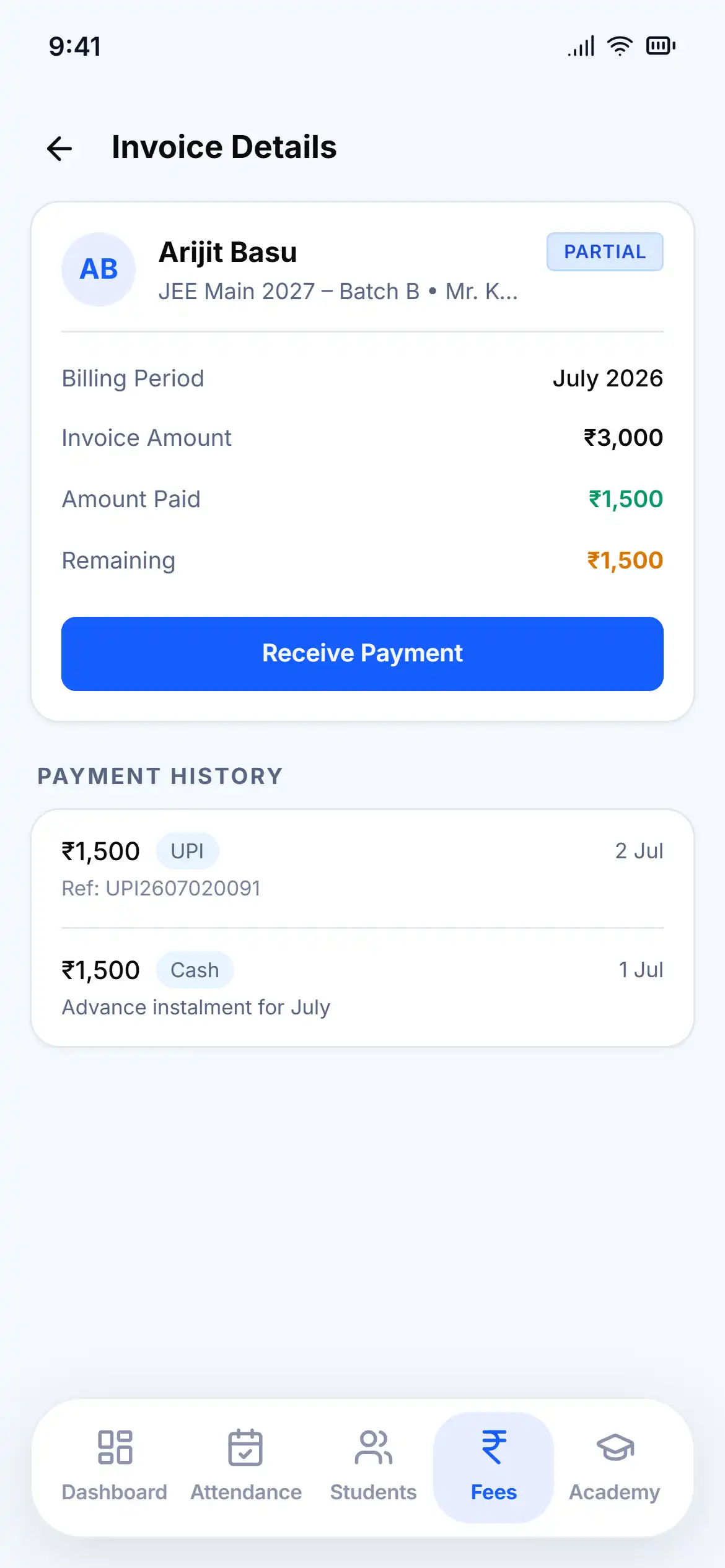
- Record transactions: Log received payments instantly from your phone or laptop.
- Maintain payment history: A clean, searchable record of every transaction per student.
- Digital receipts: Automatically generate fee receipts and invoices for your records.
Questions, answered
Yes. GuruDesk clearly highlights students with pending dues, making it easy to know who is up to date and who is behind.
Yes, you can log individual transactions for any student and immediately update their fee status.
Yes. Once a payment is logged, GuruDesk can generate a digital invoice or receipt for your records.
Absolutely. Each student profile retains a complete, accurate payment history.